Edit tax code
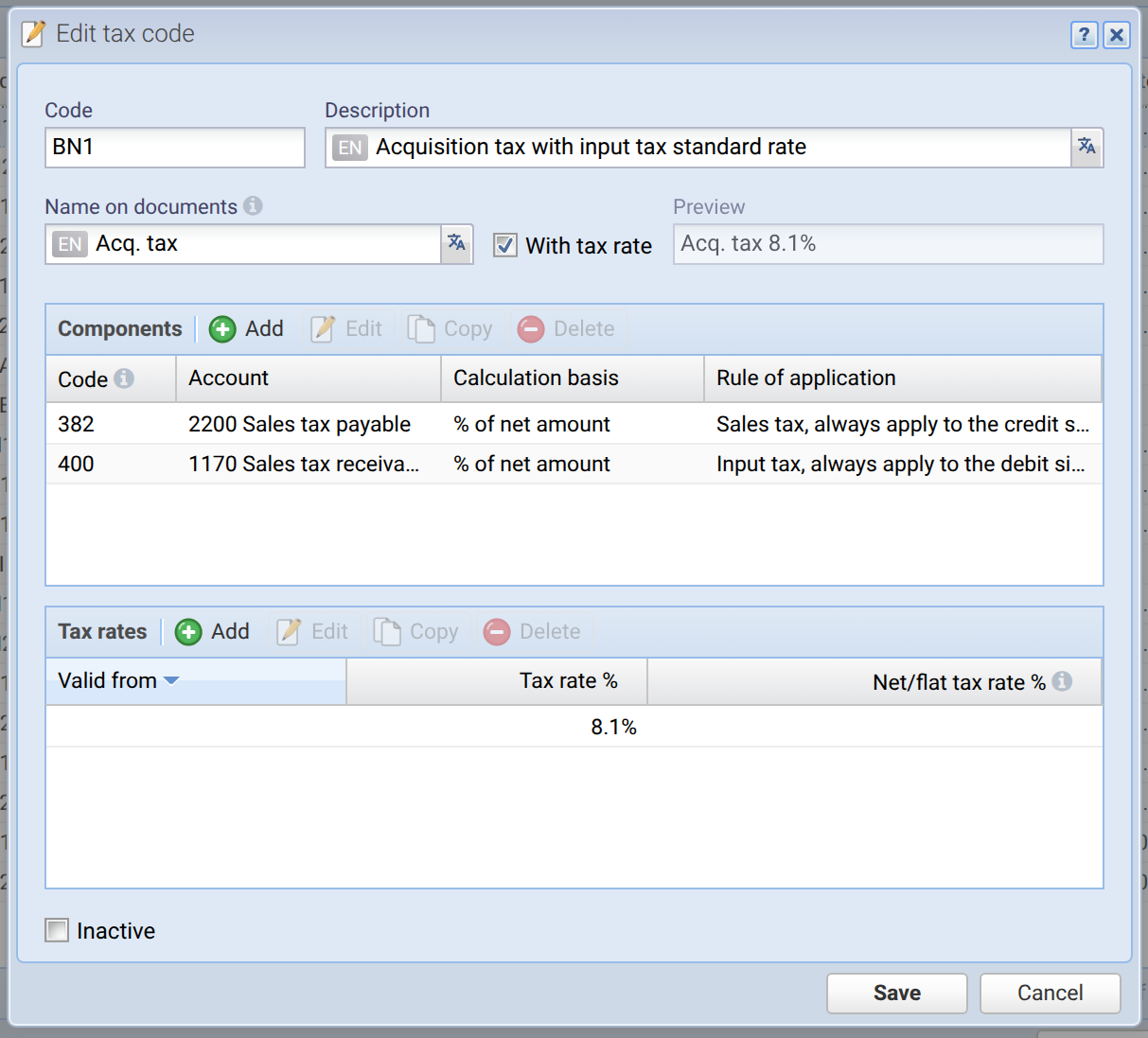
Code Mandatory field Internal code for identifying and selecting the tax code. This must be unique and may only contain alphanumeric characters in uppercase. The code may be changed at any time, even if the tax code is already in use.
Description Mandatory field A description of the tax code. This can be entered in multiple languages, see Translation field.
Name on documents The name of the tax code that appears on order documents (e.g. invoices). This should not include the tax rate, as the tax rate is appended automatically (see the ‘With tax rate’ checkbox). You can enter the description in multiple languages, see Translation field.
With tax rate If this box is ticked, the current tax rate is appended to the name on documents; see the preview next to it.
Components
A tax code can have one or more components. This means that in a book entry, the tax amount can be posted to a separate account per component. In general, there is only one component. In the special case of acquisition tax (see screenshot), however, there are two components: firstly, the acquisition tax itself, which is applied to the credit side, and secondly, the input tax deduction, which is applied to the debit side.
Code Here, one or more form codes, separated by commas, are specified, which correspond to the official VAT form of the ESTV. If, for example, ‘200,303’ is entered here, the turnover for the tax code is entered under both codes 200 and 303 on the form. See the VAT settlement report.
Account Mandatory field The account into which the tax amounts are collected.
Calculation basis
Mandatory field
There are two different ways to calculate the tax amount:
% of net amount (default):
This way, the tax rate is calculated from the net amount.Tax amount = Net amount × Tax rate ÷ 100
Example 1: Net amount is 100.00, tax rate 8%, therefore the tax amount is 8.00 and the gross amount 108.00.
Example 2: Gross amount is 100.00, tax rate 8%, therefore the tax amount is 7.41 and the net amount 92.59.
% of gross amount:
This way, the tax rate is calculated from the gross amount.Tax amount = Gross amount × Tax rate ÷ 100
Example 1: Gross amount is 100.00, tax rate 8%, therefore the tax amount is 8.00 and the net amount 92.00.
Example 2: Net amount is 100.00, tax rate 8%, therefore the tax amount is 8.70 and the gross amount 108.70.
Application rule Mandatory field Here you configure which side of a transaction (debit or credit) the tax deduction is applied to. The following rules are available:
- Always apply to the credit side
- Always apply to the debit side
- Apply to revenue account, then to the credit side
- Apply to expense account, then to the debit side
- Apply to revenue account, then expense account, then liability account, then to the credit side
- Apply to expense account, then revenue account, then asset account, then to the debit side
Tax rates
Multiple tax rates can be entered per tax code. This allows, for example, the same tax codes to remain assigned to accounts even if the tax rate changes. If there is a change, the new tax rate can simply be entered here with a ‘Valid from’ date. The app then selects the correct tax rate based on the book entry date.
Valid from The date from which the tax rate becomes valid/active. Note: Exactly one tax rate without a validity date must always be set as a fallback (the first tax rate). A new tax rate may only be entered if no entries with this tax code exist from this date onwards.
Tax rate %
Mandatory field
Enter here the effective tax rate in percent.
Net/flat tax rate %
If you agreed on a net tax rate (Saldosteuersatz / SSS) resp. flat tax rate (Pauschalsteuersatz / PSS) with the taxing authority, enter it here.
Note: The configurable calculation basis (see field above) is only used for the effective tax rate, not for the net/flat tax rate. The net/flat tax amount is always calculated from the gross amount.
Inactive
If the tax code is set to "Inactive" it is hidden in the selection box. It is, however, not deleted. Tax codes that have already been used in book entries cannot be deleted anymore, but they can be deactivated this way.