Edit user
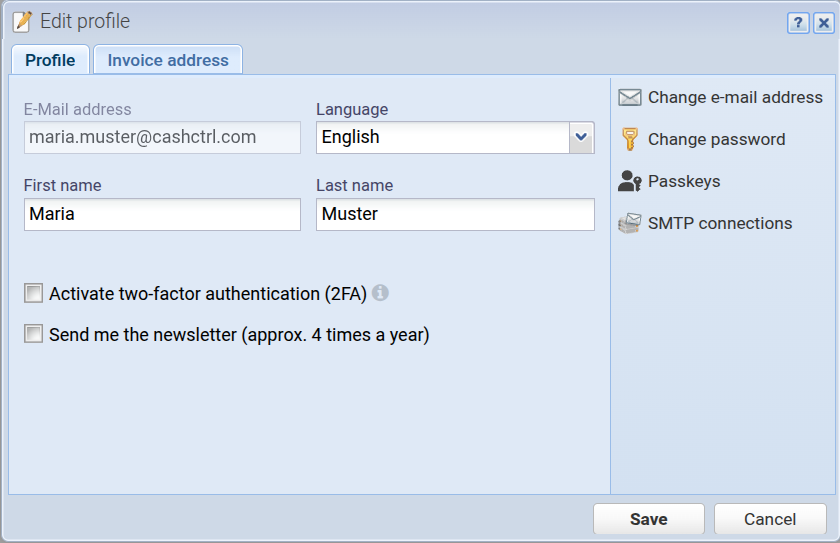
E-Mail address
Your e-mail address that is also used to log in. Click on the "Change e-mail" button below to change it.
Language
You can choose the desired language for CashCtrl's user interface here. Data is not changed thereby (i.e. the language of names of accounts remains unchanged). However, if you create a new organization the default chart of accounts is written in your current language.
First name
This is your first name.
Last name
This is your last name.
Activate two-factor authentication (2FA)
With two-factor authentication your account is secured twofold. When you login, instead of only entering e-mail address and password, you enter an additional time-based 6-digits token. This token is provided by an app like Google Authenticator, Authy or similar which is installed on your smartphone.
Send me the newsletter (approx. 4 times a year)
We occasionally send a newsletter in which we inform you about software updates related to CashCtrl. You can hereby opt in or out of the newsletter.
Show welcome screen
Shows the welcome screen after login.
Change e-mail address
Here you can change your e-mail address. You'll have to reenter your password to do so.
Change password
Here you can change your password. You'll have to enter the current password as well.
Passkeys Here you can manage your passkey, i.e. create a new passkey or rename or delete existing passkeys. Learn more about passkeys
SMTP connections [more]
Here you can add and edit SMTP connections. This allows you to send emails using your own email address as the "From" address. This is a PRO feature (not available in the free version).
Invoice address
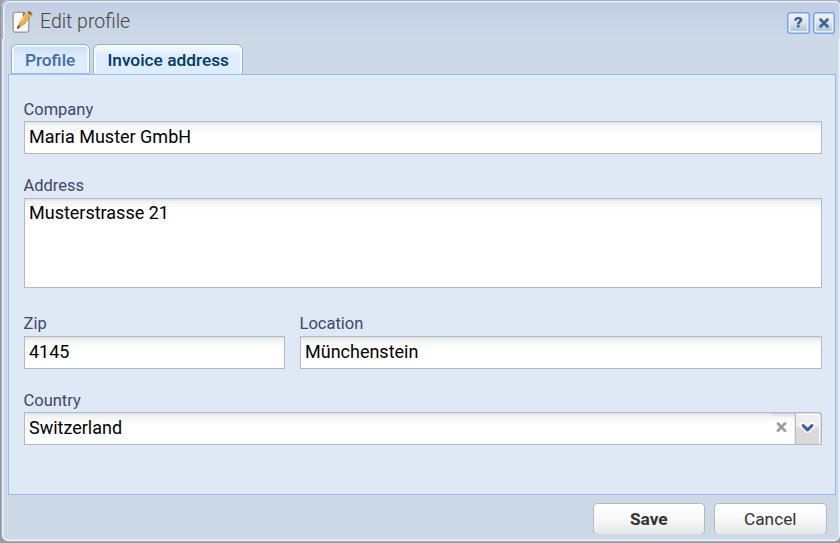
Here you can enter your invoice address. This is only mandatory if you are using the PRO version of CashCtrl.